

Time Lapse
On this page
Time Lapse#
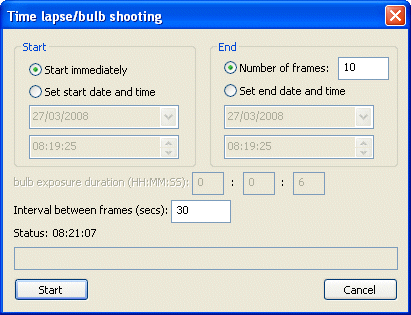
Remote Pro can shoot a time-lapse sequence. Select Time-lapse... from the Camera menu to open the time-lapse dialog.
Setting up a sequence#
- Choose whether the sequence starts immediately or at a specific date and time.
- Set when the sequence ends — either at an end date and time, or after a total number of frames.
- Set the interval between shots.
- Click Start to begin.
If the interval is shorter than the time it takes to shoot and download a picture, the sequence runs as fast as possible.
Timed bulb exposures#
On supported cameras, the same dialog also controls timed bulb exposures:
- Canon EOS-1D Mark IV, EOS-1D Mark III, EOS-1Ds Mark III
- Canon EOS 5DS R, EOS 5DS, EOS 5D Mark IV, EOS 5D Mark III, EOS 5D Mark II
- Canon EOS 6D, EOS 7D, EOS 7D Mark II, EOS 70D, EOS 60D, EOS 50D, EOS 40D
- Canon EOS 600D/Rebel T3i, EOS 550D/Rebel T2i, EOS 500D/Rebel T1i, EOS 450D/Rebel XSi
- Canon EOS 1100D/Rebel T3, EOS 1000D/Rebel XS and later models
When the camera supports it, bulb exposure duration settings appear in the dialog:
- They are only active when the camera's shutter speed is set to bulb (otherwise they are greyed out).
- Set the duration in hours, minutes and seconds, up to 24 hours.
- The bulb exposure starts when you click Start. Click Cancel to stop it at any time.
Was this page helpful?
Thanks, that helps us improve the guides.