

Displaying Images in BreezeBrowser Pro
On this page
Displaying Images in BreezeBrowser Pro#
BreezeBrowser Pro v1.9.4.4 and Later#
BreezeBrowser Pro automatically monitors a folder and displays new images as they are taken. It can also automatically update a slideshow to include new images. To enable this, select Monitor folder for changes and update display automatically in BreezeBrowser Pro's preferences (under the General tab).
BreezeBrowser Pro v1.9.4.3 and Earlier#
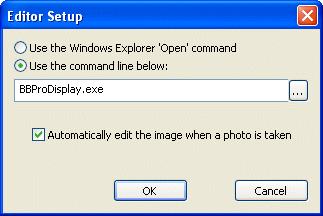
Images can be automatically displayed in BreezeBrowser Pro after being taken and downloaded to the PC. Select Setup image editor... from the File menu and configure it to run the command BBProDisplay.exe as shown below:
Was this page helpful?
Thanks, that helps us improve the guides.