

Configure.exe Utility
On this page
The Configure.exe Utility#
The Configure.exe utility provides access to less commonly used Remote Pro settings that are not exposed in the main interface. It is located in the installation folder (usually C:\Program Files (x86)\Breezesys\Remote Pro). Double-click Configure.exe to run it.
Exit Remote Pro before running Configure.exe, otherwise changes may not be saved correctly.
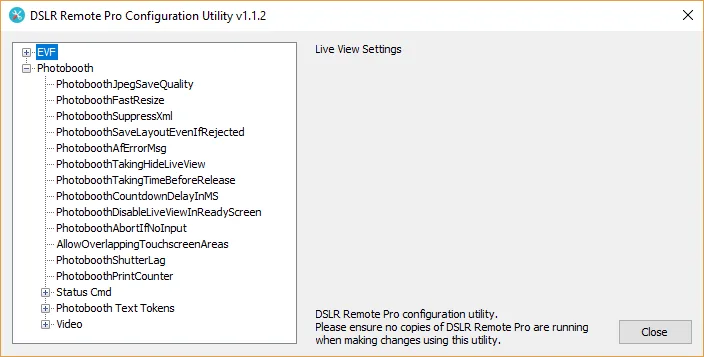
EVF Settings#
| Setting | Description |
|---|---|
EvfIntervalInMs |
Live view refresh interval in milliseconds (default 80). Smaller values give faster refresh. May affect GIF timing in video booth mode. |
EvfFocusPeakingThreshold |
Threshold for focus peaking (default 200). |
Photobooth Settings#
| Setting | Description |
|---|---|
PhotoboothJpegSaveQuality |
JPEG quality for saved print copies (default 90). |
PhotoboothFastResize |
Uses a faster (slightly lower quality) resize algorithm on slow computers. |
PhotoboothSuppressXML |
Disables writing of the XML summary file after each session. |
PhotoboothSaveLayoutEvenIfRejected |
Saves the JPEG print copy even when the user rejects photos in the confirmation screen. |
PhotoboothAfErrorMsg |
Error message displayed to users when the camera cannot lock AF focus. |
PhotoboothTakingHideLiveView |
Hides live view when the taking.jpg screen is displayed. |
PhotoboothTakingTimeBeforeRelease |
Time in ms before taking a photo that the taking.jpg screen is displayed. |
PhotoboothCountdownDelayInMS |
Offset in ms for countdown text timing. |
PhotoboothShutterLag |
Compensates for camera shutter lag in ms. |
PhotoboothDisableLiveViewInReadyScreen |
Disables live view in the ready screen; enables it only during countdown. |
PhotoboothAbortIfNoInput |
Aborts shooting if the user does not enter anything when keyboard is shown at start of sequence. |
AllowOverlappingTouchscreenAreas |
Allows touchscreen areas to overlap so one touch can activate multiple actions. Use with caution. |
PhotoboothPrintCounter |
Sets the starting value of the print counter. |
PhotoboothTapCountdown3Sec |
Allows tapping the screen to set a 3-second countdown when the remaining time is 15 seconds or more. |
PhotoboothPhotoPreviewX/Y/W/H |
Position and size of preview photos in the preview.jpg screen. |
EnablePrintCopiesStatusText |
Shows a brief status display when changing print copy count. |
InfoInactivityTimeout |
Timeout in seconds for optional information screens. |
Photobooth Setup Wizard Defaults#
| Setting | Description |
|---|---|
WizardDownloadFolder |
Default download folder (default: {documents}\\PhotoboothImages\\{dateLess8h}) |
WizardFirstPhotoInterval |
Countdown for first photo in seconds (default 5) |
WizardPhotoInterval |
Countdown for remaining photos in seconds (default 3) |
WizardGifNumFramesToCapture |
Number of frames for boomerang GIFs (default 15) |
WizardVideoClipLengthInSecs |
Video clip length in seconds (default 10) |
Sharing Settings#
| Setting | Description |
|---|---|
SharingSuccessScreenDuration |
Time in seconds to show the success screen |
SharingOfflineScreenDuration |
Time in seconds to show the offline screen |
SharingErrorScreenDuration |
Time in seconds to show the error screen |
Status Command Settings#
| Setting | Description |
|---|---|
PhotoboothStatusCmdEnable |
Enable running of external commands when status changes |
PhotoboothStatusCmd |
Command to run when screen changes |
PhotoboothStatusCmdXML |
Command to run when XML summary is written |
See External Commands for details.
Photobooth Text Tokens#
The following registry values can be used as tokens in caption text: {PhotoboothText1} through {PhotoboothText5}. Useful for printing data from RFID card readers or other external sources.
Video Settings#
| Setting | Description |
|---|---|
VideoboothKeyboard |
Shows a touchscreen keyboard in video booth mode. Set to 1 to show at start, 2 to show after capture. |
Was this page helpful?
Thanks, that helps us improve the guides.