

Controlling Booth Lighting
Legacy tutorial (2016): turn booth lights on and off automatically with a Phidgets relay board or an I-PAC LED driver board and an AutoHotkey script.
On this page
Legacy tutorial. This comes from the old Breeze website and was last updated in 2016, for DSLR Remote Pro and Webcam Photobooth. The hardware and script still work the same way, but check the suppliers for current parts. Breeze Booth for iPad can control LED lighting from the app itself. For other ways to control Remote Pro from scripts, see AutoHotkey Scripts and External Commands.
This tutorial shows how to turn photo booth lights on and off automatically, using either a Phidgets relay board (PhidgetInterfaceKit 0/0/4) or an I-PAC LED driver board.
- The LED driver board can power LED lamps and illuminated switches without an extra power supply, because it is powered from the USB connection.
- The Phidgets relay board needs a separate power supply, and can switch higher voltages and currents than the LED driver board.
The relay board is technically capable of switching mains voltages, but consult a qualified electrician if you intend to do this, so that your booth is safe. If you need to control mains supplies, a USB mains switch (for example from www.pwrusb.com or www.cleware.net) may be a better choice.
Parts required#
- A relay or driver board, either:
- a Phidgets PhidgetInterfaceKit 1014 0/0/4 relay board from www.phidgets.com, or
- an I-PAC LED driver board from Ultimarc in the US or Arcade World in the UK
- A power supply (not needed for low-power LEDs with the I-PAC LED driver board)
- Lights, or illuminated arcade-style buttons, and wiring
The LED bulbs used in arcade-style switches can be connected directly to the LED driver board, or to a 5V DC power supply when using the relay board. Standard LEDs must be wired in series with a 1K ohm resistor to limit the current, otherwise the board, power supply or LED might be damaged.
Installation#
AutoHotkey#
Download and install AutoHotkey if it is not already on your system. It is a free download from www.autohotkey.com. Then download and unzip the file containing the driver utility programs and the script that controls the lights: photobooth_lights.zip.
Phidgets#
If you use the Phidgets relay board, also download and install the Phidgets drivers. The I-PAC LED driver board needs no extra drivers.
Testing#
When everything is connected, open a Windows Command Prompt and test the board:
- Phidgets relay board: run
PhidgetRelay.exe 1to turn relay one on andPhidgetRelay.exe 0to turn it off. You should hear the relay click as it switches. - I-PAC LED driver: run
PacLED.exe 1to turn LED one on andPacLED.exe 0to turn it off. The LED driver is completely silent, so you can only tell it is working if an LED is connected to its outputs.
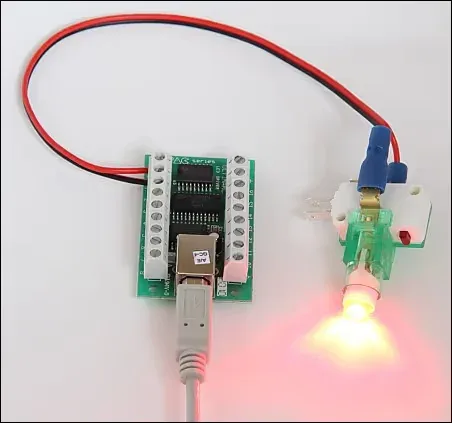
The photobooth_lights.ahk script#
photobooth_lights.ahk is a simple AutoHotkey script that watches which screen the photo booth software is showing, and turns the relays or LED driver channels on and off. It controls the lights by calling a small control program: PhidgetRelay.exe for the Phidgets relay board, or PacLED.exe for the I-PAC LED driver board.
Both programs take a single argument, a decimal number: 1 turns on the first relay or channel, 2 the second, 4 the third, 8 the fourth, and so on. Add the values together to change several channels in one call. For example, to turn on relays 1 and 3 and turn off the rest, use 5.
Edit the script in a text editor such as Notepad and set RelayExe to match your board:
- Phidgets relay board:
RelayExe = PhidgetRelay.exe - I-PAC LED driver board:
RelayExe = PacLED.exe
Operation#
Double-click the script in Windows Explorer, then run the photo booth as normal.
By default the script turns the first relay or channel on while the ready screen is displayed, and off when it is not. Edit the script if you need different behaviour.
Was this page helpful?
Thanks, that helps us improve the guides.