

DNP Printer Alerts
Get a text, email or webhook when a DNP printer is running low on prints or has stopped printing.
On this page
Printer Alerts#
When you use DNP direct printing, Remote Pro can tell you when prints are running low or the printer has stopped, so you can swap media or clear a problem before guests notice.
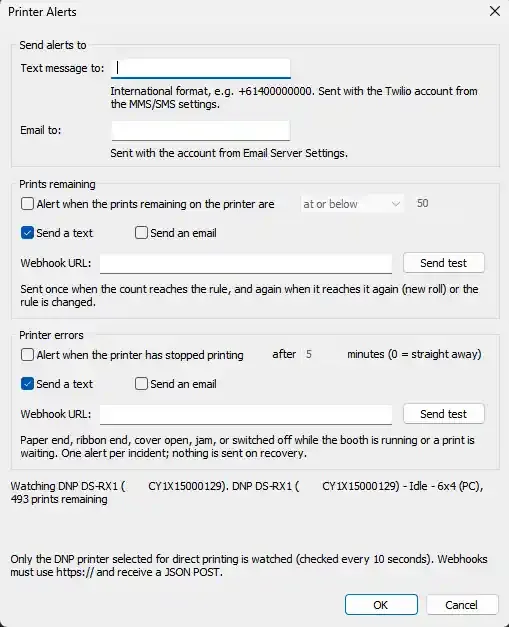
Open File > Printer Alerts... or click Alerts... in DNP Direct Printing Setup.
Where alerts go#
- Text message to: a mobile number with its country code, for example +61400000000 in Australia or +1 in the US.
- Email to: the address to send alerts to.
Texts use the Twilio account in your MMS/SMS settings, and emails use File > Email Server Settings. If those aren't set up, text and email alerts won't be sent.
Prints remaining#
Tick Alert when the prints remaining on the printer are, choose at or below, exactly or at or above, and enter a number. Then choose Send a text, Send an email and/or a Webhook URL.
The alert is sent once when the count reaches the rule, and again after a new roll is loaded or the rule is changed.
Printer errors#
Tick Alert when the printer has stopped printing and set how many minutes to wait (0 alerts straight away). Choose Send a text, Send an email and/or a Webhook URL.
This covers paper end, ribbon end, cover open, paper jam, or the printer being switched off while the booth is running or a print is waiting. One alert is sent per incident, and nothing is sent when the printer recovers.
Webhooks#
Use a webhook to trigger your own workflow. The URL must use https:// and receives a JSON POST. Click Send test to try it.
Only the printer selected for direct printing is watched, checked every 10 seconds.
Was this page helpful?
Thanks, that helps us improve the guides.