

Watermark/Captioning
Up to two watermarks or captions can be added to images — useful for easy identification or for a copyright message. Each watermark can be text or an image. The two watermark settings are independent; for example, one can display "Proof" in the centre, and the other can caption or display copyright info.
Select "Watermark 1" or "Watermark 2" and click "Settings" to open the Watermark Settings dialog.
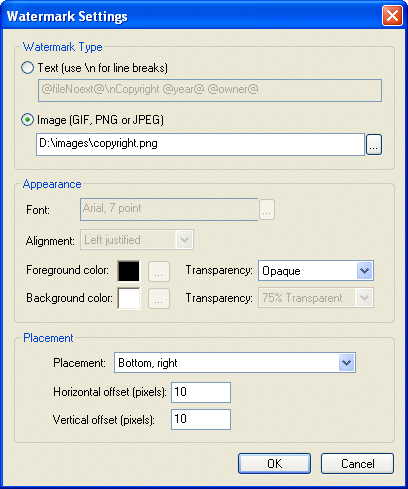
Settings#
Type: Select text or image.
Text tokens: The caption text can include any HTML tokens (see HTML Tokens) to embed EXIF or IPTC data, e.g. year for the year the image was taken. Use @\n@ for line breaks. Use the Alignment dropdown for multi-line text alignment.
Font: Click "..." to select font type, size and appearance. TrueType fonts (e.g. Arial) produce anti-aliased text. Font size in pixels is determined by the point size and output DPI. If resizing using inches/cm, the specified DPI is used; otherwise the screen DPI (usually 96) applies.
To include the copyright symbol ©, hold ALT and enter 0169 on the numeric keypad.
Image watermarks: Supports JPEG, GIF, or PNG. GIF and 8-bit PNG support single-level transparency; 24-bit PNG supports multi-level transparency for smooth edge blending.
Colours: Click "..." next to foreground/background colour displays (disabled for image watermarks).
Transparency: Set from opaque to 100% transparent in 25% steps.
Placement: Use the "Watermark placement" dropdown and horizontal/vertical offset values. e.g. a vertical offset of 5 pixels with top-centred placement positions the watermark 5 pixels from the top.
Examples#

Black 75% transparent foreground, White 75% transparent background — repeating strips at 1/5 and 4/5 height

Green opaque foreground, 100% transparent background — bottom, centre placement

Black opaque foreground, White 50% transparent background — top, centre placement

Transparent GIF image — bottom, centre placement with 4 pixel vertical offset
Was this page helpful?
Thanks, that helps us improve the guides.