

Regenerate Embedded JPEGs
Canon CRW raw files contain an embedded JPEG for display in Main View. On Canon PowerShot cameras this is only 640×480 pixels. Use Tools > Regenerate Embedded JPEGs... to replace it with a larger JPEG converted using the "As Shot" settings.
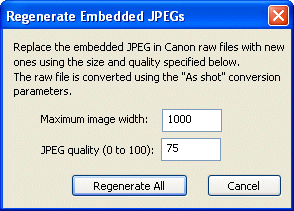
Set the image size between 100 and 3500 pixels (capped at the camera's resolution) and choose a JPEG quality level. Higher quality produces a larger file.
Was this page helpful?
Thanks, that helps us improve the guides.