

HTML
On this page
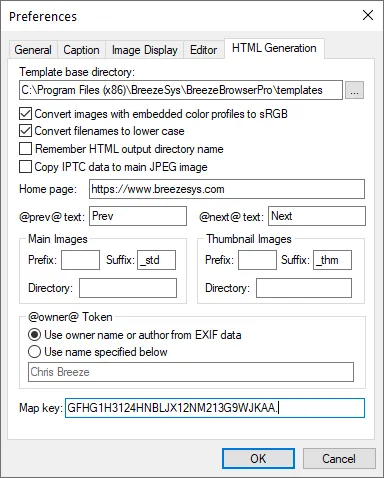
Template Location#
The default location for HTML templates is the templates folder in the BreezeBrowser Pro installation directory. To store templates elsewhere (e.g. in My Documents for easier backup), type the new path or click "..." to browse.
No templates will be listed in the HTML dialog if the template base directory is set incorrectly.
Colour Space Conversion#
Web browsers use sRGB. Select "Convert images with embedded color profiles to sRGB" to convert TIFF and JPEG images with embedded profiles to sRGB when generating HTML pages.
Lowercase Filenames#
The Windows filing system is case-insensitive, but web servers are case-sensitive. This can cause broken links when pages that work locally are uploaded to the web. Select "Convert filenames to lower case" to avoid this problem.
Output Directory#
The default HTML output directory is a HTML folder in the same directory as the images. Select "Remember HTML output directory name" to have the generator reuse the same output directory each time.
Take care not to overwrite existing HTML pages when using this option.
IPTC Data#
By default IPTC data is not copied to images created by the HTML generator. Select "Copy IPTC data to main image" to include it.
Home Page URL#
Specify your home page URL here. The HTML generator replaces the homeURL token in templates with this value.
Prev/Next Link Text#
The next and prev tokens in templates generate links with default text "Next" and "Prev". Use the "prev text" and "next text" fields to customise this.
Image Directories and Suffixes#
By default, HTML pages and images are created in the same directory, using _std for main images and _thm for thumbnails. You can specify separate subdirectories and custom suffixes for main and thumbnail images.
If the main and thumbnail suffixes are the same (or both empty), they must be stored in different directories.
owner Token#
Several templates use owner for copyright text — extracted from EXIF owner name (Canon) or artist field (other cameras). Select "Use name specified below" to override with your own text.
Map Key#
Some mapping services (e.g. Google Maps) require an API key for web pages containing maps. Enter the key in the "Map key:" field; it is accessible in templates via the mapKey token.
Was this page helpful?
Thanks, that helps us improve the guides.