

Editing IPTC Data
On this page
Select an image in main or thumbnail view, then right-click and select Edit IPTC/XMP Data... or use the Edit menu. The option is grayed out for file types that don't support IPTC.
The IPTC Data dialog has six tabs: Description, Keywords, Categories, Contact, Origin, and Image.
Using Tokens#
Tokens can be used to insert image/EXIF data into IPTC fields. For example, time, iso, model. The same tokens as used for HTML generation apply. Press Show tokens... to see available tokens and their values.
Do not use IPTC tokens (e.g. IPTC_caption) inside the IPTC editor — this can cause unexpected results.
Load / Save / Merge#
- Save... — save the current IPTC data to a file.
- Load... — replace all current IPTC data with previously saved data.
- Merge... — fill only empty fields using previously saved data (preserves existing values).
BBP can read XMP text files, Adobe Photoshop File Info files (.ffo), and Fotostation IPTC files (.ipt).
Navigating Images#
Press < Prev / Next > (or Ctrl+[ / PageUp and Ctrl+] / PageDown) to save the current image's data and move to the next. Click the thumbnail for a larger preview.
Tab Details#
Description#
All fields are free text. Urgency: 0 = none, 1 = high, 8 = low. Use Use EXIF comment to copy the EXIF user comment to the description field.
Keywords#
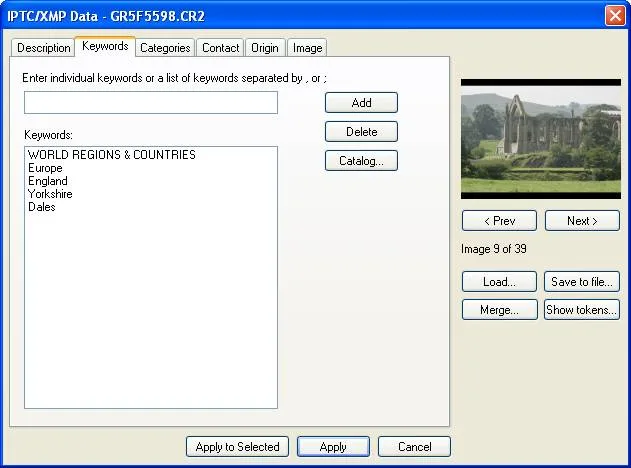
Each keyword must be unique and max 64 characters. Type in the text box and press Enter or Add. Select and press Delete to remove. Press Catalog... to browse a pre-defined keyword list (keywords.txt in the BBP installation folder). Keyword catalogs are also available from controlledvocabulary.com, photo-keywords.com, and keyword-catalog.com.
Categories#
Main category is free text. Supplemental categories are a unique list (add/delete same as keywords).
Contact#
All free text — typically photographer contact information.
Origin#
All free text except Date Created — must be in YYYYMMDD format (e.g. 20060326). Press the > button to set date from EXIF, file timestamp, or a date picker.
Image#
Rights usage is free text. Intellectual genre, IPTC scene, and IPTC subject codes use a controlled vocabulary — press Catalog... to browse and select from the IPTC topicset XML files (stored in the topicset folder of the BBP installation).
Was this page helpful?
Thanks, that helps us improve the guides.