

Batch Renaming
On this page
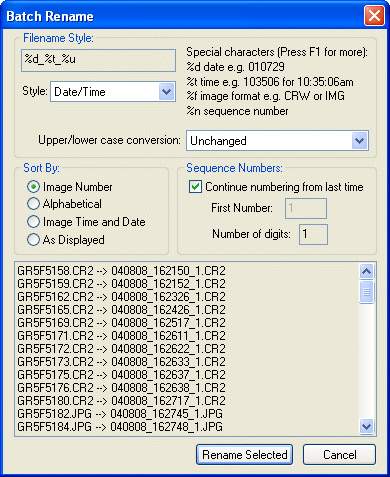
The Batch Rename dialog renames all images in a directory using predefined or custom naming schemes. Access it via the Tools menu.
Predefined Schemes#
Seven predefined schemes are available:
- Standard — Canon-style
CRW_orIMG_prefix + 4 digits (e.g.IMG_0001.jpg). - Enhanced — same as Standard but with 5 digits (up to 99,999).
- Numbered — number first, so numeric and alphabetical order match.
- Date —
YYMMDD+ 3-digit sequence number. - Date + Type — like Date but appends file type (e.g.
CRW3,IMG). - Date/Time —
YYMMDD+HHMMSS+ 1-digit sequence (for 3fps bursts). - ZoomBrowser-style —
fff-nnnn_ttt.ext(folder, image number, type).
Sort Order#
The Sort By option controls the order files are renamed:
- Image Number — by image number in filename.
- Alphabetical — standard alpha sort.
- Image Time and Date — chronological by EXIF date/time (falls back to file timestamp).
- As Displayed — same order as thumbnail view.
Options#
- Starting sequence number — defaults to 1; can be any number.
- Continue numbering from last time — picks up from the previous batch rename sequence.
- Upper/lower case conversion — options: Unchanged, Convert extension to lower case, Convert filename to lower case, Convert filename to upper case.
Custom Naming#
Select the Custom style to define your own scheme using special characters:
| Code | Meaning | Example |
|---|---|---|
%d |
Date (YYMMDD) | 010930 |
%t |
Time (HHMMSS) | 223415 |
%f |
File type | CR3, IMG |
%x |
File extension | jpg |
%n |
Sequence number | 0001 |
%N |
Canon folder+number (dddnnnn) | 4010123 |
%e |
Frame number (burst) | 01 |
%r |
Canon image number (last 4 digits fallback) | 0123 |
%o |
Original filename (no extension) | CRW_0001 |
%d%t_%r |
Date + time + image number | — |
%Y, %y |
Year with/without century | 2001, 01 |
%m |
Month (01–12) | 09 |
%D |
Day (01–31) | 29 |
%H, %I |
Hour 24h / 12h | 23, 11 |
%M |
Minute | 53 |
%S |
Second | 07 |
%F |
Focal length (mm) | 28 |
%A |
Aperture | 5.6 |
%s |
Shutter speed | 125 |
%i |
ISO | 100 |
%T |
Camera model (abbreviated) | 10D |
%u |
Unique number suffix | 1 |
%[n] |
nth character of original filename | %[3] → G from IMG_1234 |
%[n-m] |
Characters n to m of original filename | %[3-5] → G_1 |
%[-n] |
Last n characters | %[-4] → 1234 |
String functions: {left,n,str}, {mid,n,m,str}, {right,n,str}, {first,str}, {last,str} — extract parts of tokens or strings.
HTML tokens (e.g. caption) can also be used. Characters invalid in Windows filenames (\ / : * ? < > | ") are replaced with underscores.
Notes: Dates/times come from EXIF data (falls back to file timestamp). To rename only selected images, switch to thumbnail view first. The preview at the bottom of the dialog shows current and new names.
Was this page helpful?
Thanks, that helps us improve the guides.