

What's New in Downloader Pro v2.0?
On this page
What's New in Downloader Pro v2.0?#
Thumbnail Display#
Images to be downloaded can be displayed as large or small thumbnails. Select from the View menu or type Ctrl+T (small) or Ctrl+X (large).
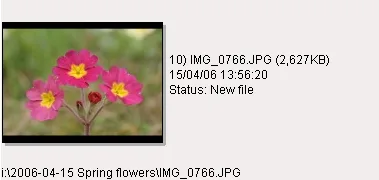
Each thumbnail caption shows: image number, filename, file size, date/time taken, download status, and download path. A single thumbnail may represent multiple files (e.g. Canon CRW raw files with their THM thumbnail).
Thumbnails cannot be displayed when downloading directly from a Canon camera via USB or FireWire.
IPTC/XMP Support#
Downloader Pro v2.0 supports the IPTC XMP standard as used by Adobe Photoshop and BreezeBrowser Pro. XMP data is added directly to JPEG, TIFF and DNG files, and stored in XMP sidecar files for other raw formats.
Date-Based Job Codes#
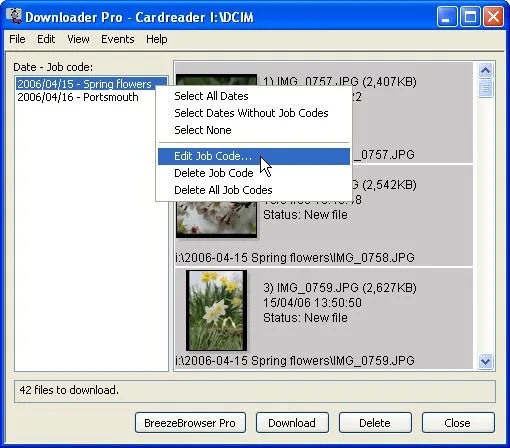
Display the image date selector with Ctrl+Tab or from the View menu. Select one or more dates (hold Ctrl and click to add to the selection). Right-click a date to access options for selecting dates and editing the job code.
Downloader Pro saves job codes from the last 60 days so they are available next time it runs.
New Token Style#
Tokens are now enclosed in curly brackets, e.g. {a} replaces %a. When Downloader Pro v2.0 runs for the first time, it automatically converts old tokens to the new format.
New Sequence Numbering#
Supports continuous numbering using tokens {seq#}, {seq#2}, {seq#3}, {seq#4}, {seq#5}, {seq#6}. Numbers are allocated in timestamp order and continue from the last downloaded image next time Downloader Pro runs. The starting number can be reset in preferences.
GPS Geo-Tagging#
Automatically stores GPS location data in images as they are downloaded using track log data from devices such as the Sony GPS-CS1. See GPS Geo-Tagging for details.
Backup Plug-in Extended#
The backup plug-in now supports automatic backup to two separate locations.
Was this page helpful?
Thanks, that helps us improve the guides.