

DNG Convert
On this page
DNG Convert Plug-in#
This plug-in automatically converts raw image files to Adobe DNG format as they are downloaded. It uses Adobe's free DNG Converter, which must be installed separately.
More information about DNG: adobe.com/dng
Setup#
- Download and install Adobe DNG Converter (free).
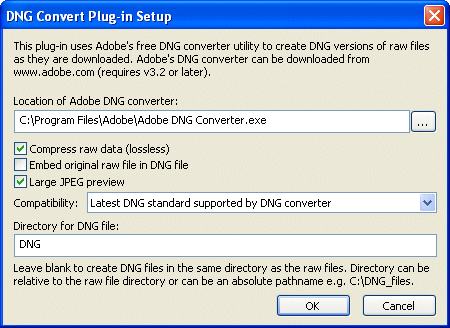
- In Downloader Pro, press ... to browse to the DNG Converter location.
- Select the required options.
The compatibility dropdown selects the DNG standard version for compatibility with older software (e.g. Photoshop CS, Lightroom 1.0). Leave at the default (Latest DNG standard) unless you need to support older software.
DNG Directory#
By default, DNG files are stored alongside the raw files. To specify a different location, enter a path in Directory for DNG file:. This can be relative or absolute.
| Directory | Description | Example |
|---|---|---|
DNG |
Sub-directory alongside raw files | Raw: C:\Photos\2005-11-12\IMG_1234.CR2 → DNG: C:\Photos\2005-11-12\DNG\IMG_1234.dng |
C:\DNG files |
Fixed absolute path | C:\DNG files\IMG_1234.dng |
D:\DNG\{Y}\{Y}-{m}-{D} |
Date-based path using tokens | D:\DNG\2005\2005-11-05 |
DNG conversion takes several seconds per file. Downloads will take longer when this plug-in is enabled.
Adobe, Photoshop and Lightroom are registered trademarks of Adobe Systems Incorporated.
Was this page helpful?
Thanks, that helps us improve the guides.