

Download Path
On this page
Download Path#
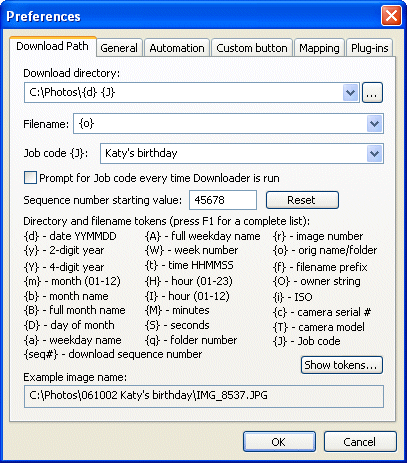
The download directory is the base location where images are saved. Click ... to browse for a directory. The actual directory can be customised using tokens. The default is C:\Photos\{d} which stores images in separate folders by the date taken.
A dropdown arrow shows the last 12 settings used.
Download Directory Examples#
| Download Directory | Description | Example |
|---|---|---|
C:\Photos\{T}\{d} |
Camera model + date taken | C:\Photos\10D\20030416 |
C:\Photos\{1}-{2}-{3} |
Today's date (download date) | C:\Photos\2003-04-17 |
C:\Photos\{Y}\{Y}-{m}-{D} |
Year + full date taken | C:\Photos\2003\2003-04-16 |
C:\Photos\{d} {J} |
Job code + date taken | C:\Photos\20030416 Katy's birthday |
C:\Photos\{O}\{d} |
Camera owner + date (Canon only) | C:\Photos\Chris Breeze\20030416 |
C:\Photos\{c}\{d} |
Camera serial number + date | C:\Photos\0230104671\20030416 |
Filename Examples#
The filename defaults to {o} (original camera filename). Alternatives:
| Filename | Description | Example |
|---|---|---|
{d}_{o} |
Date + original filename | 030214_IMG_0123.JPG |
{q}_{o} |
Folder number + original filename | 678_IMG_0123.JPG |
{J}{d}_{o} |
Job code + date + original filename | Katy's birthday 20030416_IMG_0123.JPG |
{d}_{t}_{r1} |
Date + time + last digit of image number | 031029_223015_7.JPG |
{i}_{o} |
ISO setting + original filename | 400_IMG_0123.JPG |
{d}_{seq#6} |
Date + 6-digit sequence number | 061121-001234 |
Job Code#
The {J} token inserts the job code into the download path or filename. Enable Prompt for job code every time Downloader Pro is run to enter a description before each download.
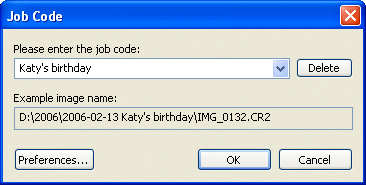
Example: with the download directory set to D:\{Y}\{Y}-{m}-{D} {J}, entering Katy's birthday stores files at:
D:\2006\2006-02-13 Katy's birthday\IMG_0001.JPG
Supported Formats#
Shooting data tokens work with: JPEGs and TIFFs from all digital cameras, Canon raw files (CRW, TIF), Nikon NEF, Fuji RAF, Olympus ORF, Pentax PEF, Minolta MRW, Sony raw files, Canon AVI movie files, Kodak DCR, and DNG raw files.
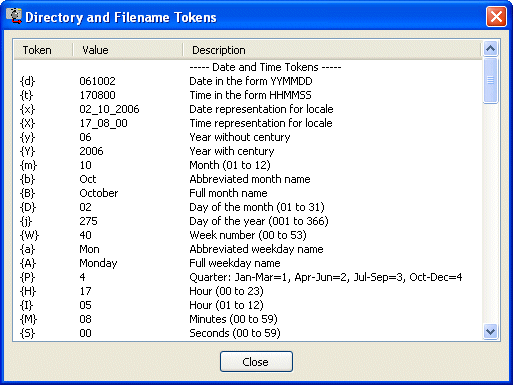
Press Show tokens... to display all available tokens and their values for the current example file.
Sequence Numbers#
The download sequence number tokens (e.g. {seq#}) maintain a running count of downloaded images. The starting value is saved when Downloader Pro exits and can be set to any required value in preferences.
Was this page helpful?
Thanks, that helps us improve the guides.