

Camera Settings Dialog
Camera Settings Dialog#
Select Camera Settings from the File menu when connected to Canon EOS cameras or older Canon PowerShot cameras.
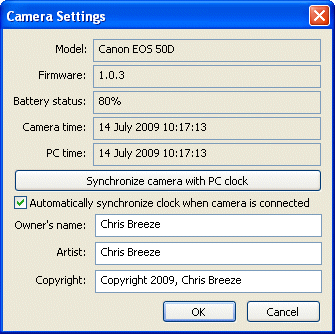
This dialog shows camera information and allows you to:
- Synchronize the camera's internal clock with your PC's clock.
- Set the Canon camera owner string.
- Set the artist and copyright fields (supported on recent Canon EOS models such as the EOS 50D and EOS 5D Mark II).
Clock synchronization may be accurate to within one second on some Canon camera models.
Select Automatically synchronize clock when camera is connected to sync the clock automatically each time Downloader Pro connects.
Was this page helpful?
Thanks, that helps us improve the guides.