

Event Info
Event Info#
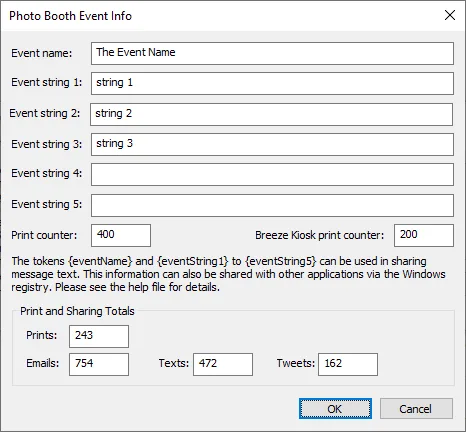
Event information can be defined for use in share messages, folder names, and filenames. Values are stored in and read from the Windows registry, so they can be shared with or set by other Breeze Systems applications.
Open via File > Event info...:
Event Tokens and Registry Keys#
| Item | Token | Registry value |
|---|---|---|
| Event name | {eventName} |
HKEY_CURRENT_USER\Software\BreezeSystems\Event Info\EventName |
| Event string 1 | {eventString1} |
HKEY_CURRENT_USER\Software\BreezeSystems\Event Info\EventString1 |
| Event string 2 | {eventString2} |
HKEY_CURRENT_USER\Software\BreezeSystems\Event Info\EventString2 |
| Event string 3 | {eventString3} |
HKEY_CURRENT_USER\Software\BreezeSystems\Event Info\EventString3 |
| Event string 4 | {eventString4} |
HKEY_CURRENT_USER\Software\BreezeSystems\Event Info\EventString4 |
| Event string 5 | {eventString5} |
HKEY_CURRENT_USER\Software\BreezeSystems\Event Info\EventString5 |
| Print counter (shared) | — | HKEY_CURRENT_USER\Software\BreezeSystems\Event Info\PrintCounter |
| Breeze Kiosk print counter | — | HKEY_CURRENT_USER\Software\BreezeSystems\BreezeKiosk\100\PrintCounter |
Print Counters#
- Print counter — shared with other Breeze apps (e.g. DSLR Remote Pro); decremented by any app that prints
- Breeze Kiosk print counter — private to Breeze Kiosk only
Print and Sharing Totals#
Totals are shown at the bottom of the Event Info dialog and updated each time a photo is printed or shared. Reset by entering new values and pressing OK.
| Counter | Registry value |
|---|---|
| Prints | HKEY_CURRENT_USER\Software\BreezeSystems\BreezeKiosk\100\TotalPrintCounter |
| Emails | HKEY_CURRENT_USER\Software\BreezeSystems\BreezeKiosk\100\EmailCounter |
| Texts | HKEY_CURRENT_USER\Software\BreezeSystems\BreezeKiosk\100\TextCounter |
| Tweets | HKEY_CURRENT_USER\Software\BreezeSystems\BreezeKiosk\100\TweetCounter |
Was this page helpful?
Thanks, that helps us improve the guides.