

Custom Domains
On this page
Custom Domain Overview#
Custom domains allow you to offer a more personalised experience to your users, by having galleries and microsites reflect your own brand. Custom domains can be configured on a global level (so all events use the same custom domain by default) and also on an Event level (so specific events can use a specific domain).
- Domain Name Structure
- Configuring DNS
- Global Custom Domain
- Event Specific Domains
- Custom 404 & Loading Pages
Domain Name Structure#
By default gallery and microsite URLs use the sharethis.co domain with the following structure:
| Sessions | https://sharethis.co/your-company/s/ABC123FGH |
|---|---|
| Galleries | https://sharethis.co/your-company/e/event-slug |
With a custom domain you can use your own subdomain. Instead you could have something like:
| Sessions | https://media.photobooth.co/s/ABC123FGH |
|---|---|
| Galleries | https://media.photobooth.co/e/event-slug |
Configuring DNS#
In order to use a custom domain, you must create an A Name Record with your DNS / Domain Host pointing to: 209.250.234.148
Domain names can take 24 - 48 hours to become live (usually quicker)
Configuring Global Domain#
You can create a Global custom domain that will be used for any new event that is created. Once the DNS is configured, go to your General Settings and scroll down to Custom Domain and enable Custom Domain and enter your custom URL.

Configuring an Event Specific Domain#
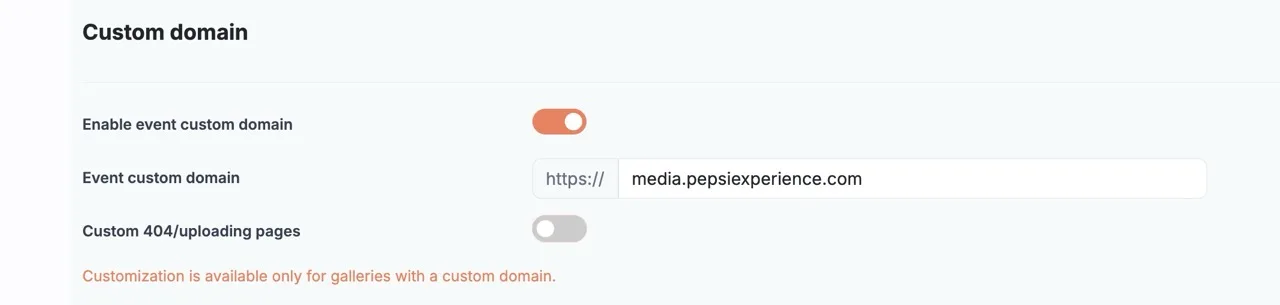
You can create event specific domain names. This is useful for brand activations, where the microsite URL should relect the end client's brand and not your own brand. eg: media.pepsiexperience.com
Once the DNS is configured, within the Event Details of your event enable Event Custom Domain and add the custom URL
Custom 404 & Loading Pages#
When using Event Specific domain names, you can also customise the 404 and Loading Pages allowing for a more seamless brand experience.
| Option | Description |
|---|---|
| Title | The Page Title |
| Background Color | Set the background color |
| Background Image | Set option background image |
| Loading image | Set the loading/404 image (can be .gif) |
| Image Height | Set height of the loading / 404 image |
| Favicon | Set the browser display icon |
Was this page helpful?
Thanks, that helps us improve the guides.