

Grid and Focus Point Overlays
On this page
Grid and Focus Point Overlays#
Grid Display#
Press Ctrl+G or select View > Display Grid to toggle the grid overlay. Select View > Grid Settings... to configure it.
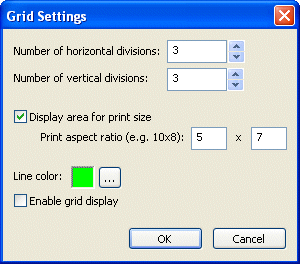
Enable Show print area to display the extent of a specific print size. For example, a digital SLR's 3:2 aspect ratio fits a 6"×4" print exactly but must be cropped for 10"×8". Enter the print dimensions (e.g. 10 × 8) to display the crop boundary.
The grid display only appears on the preview image — it does not affect saved images.
Focus Point Overlay#
Press Ctrl+F or select the Display overlay checkbox to toggle the focus point overlay. When enabled, the seven focus point areas and the viewfinder circle are shown over the preview image. Active focus points are displayed in red.
The focus point overlay only appears on the preview image — it does not affect saved images.
Was this page helpful?
Thanks, that helps us improve the guides.