

Editing Images and Editor Setup
On this page
Editing Images and Editor Setup#
Right-click an image and select Edit Image (or press F3) to open it in an image editor. First configure the editor via File > Setup Image Editor.
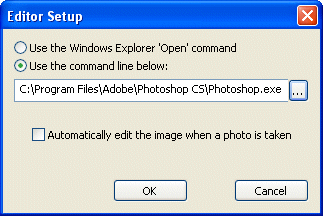
Two options are available:
- Use the Windows Explorer 'Open' command — uses the same editor as double-clicking in Windows Explorer
- Specify a custom command line to a different editor
Select Automatically edit image when a photo is taken to load images into the editor as they are captured. Take care not to load too many images at once as this may cause memory issues.
Notes#
- Only images saved to disk can be edited — preview images cannot
- Most image editors cannot open Canon raw files directly and will display an error if you try
Was this page helpful?
Thanks, that helps us improve the guides.