

Adding Comments and IPTC Data
On this page
Adding Comments and IPTC Data#
Adding Comments#
Enter comment text in the edit box above the histogram to automatically add comments to images as they are taken.
To edit comments on existing images, right-click the image and select Edit comments.... Comments can only be edited on images saved to disk.
Adding IPTC Data#
Multi-Camera can automatically embed IPTC data in raw and JPEG images as they are taken (only when saving to the PC's hard disk). Enable via File > Add IPTC data to images, then edit the data via File > Edit IPTC...:
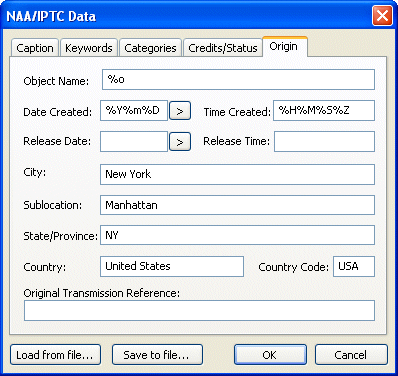
Click the tabs along the top to select different IPTC data types. Save settings for reuse with Save to file... and reload with Load from file....
IPTC data can be entered as plain text or using tokens evaluated at the time of shooting, e.g. %Y for the year. See the IPTC Tokens page for available tokens.
Was this page helpful?
Thanks, that helps us improve the guides.