

Main Window
On this page
Connected Devices Panel#
Displays Apple devices currently connected via the sync service. For each device the panel shows:
- Name — the Apple device's display name
- IP Addr — the device's local network IP address
- Status — current activity (e.g. Processed Photo, idle)
- Battery — battery level reported by the device
- Id — unique device identifier
- Username — the Breeze Booth account username on the device
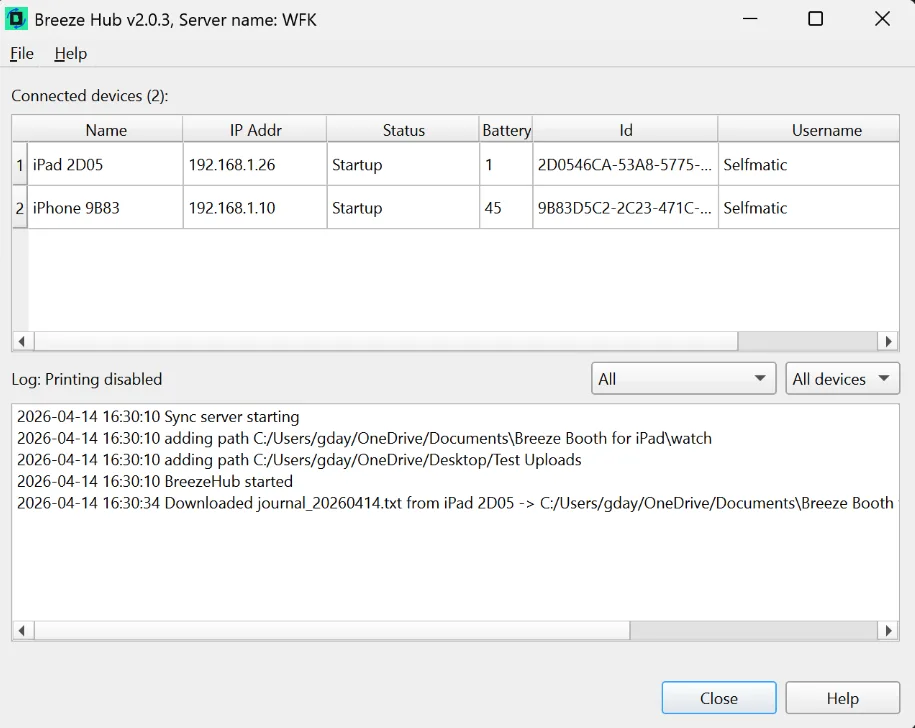
This panel is only populated when the sync service is enabled and iOS/MacOS devices are connected. It is not used with Remote Pro.
Log Panel#
Displays real-time activity for all workflows — file downloads, print jobs, upload events and errors. Use the filter dropdowns at the top right to filter by event type or specific device.
The status bar above the log shows a running print count for the current session.
Was this page helpful?
Thanks, that helps us improve the guides.