

Breeze Cloud Upload
Breeze Cloud Upload#
Open via File > Preferences > Upload to Breeze Cloud tab.
Breeze Hub can automatically upload photos to a Breeze Cloud gallery by watching a specified folder. A Breeze Cloud Pro account is required — visit cloud.breezesoftware.com to set one up.
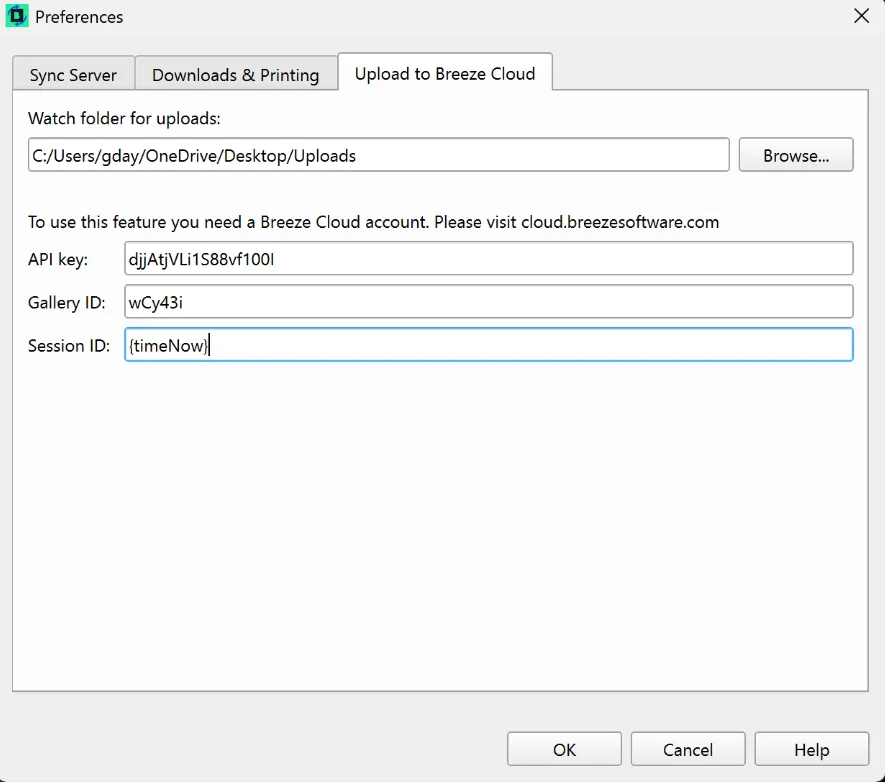
| Field | Description |
|---|---|
| Watch folder for uploads | The folder monitored for images to upload. |
| API key | Your Breeze Cloud API key. |
| Gallery ID | The ID of the target gallery to upload into. |
| Session ID | The session within the gallery to associate uploads with. |
Was this page helpful?
Thanks, that helps us improve the guides.