

Kiosk: Selection First
Set up the MDB Utility so guests pay for prints in Breeze Kiosk, with the terminal in Selection First (MDB Level 3) mode.
On this page
Overview#
This example charges for prints in Breeze Kiosk. When the guest taps Print, Breeze Kiosk shows the print payment screen and the card reader displays the amount. Once the guest pays and the payment is authorised, the photos print.
- Terminal mode: Selection First (MDB Level 3). See Level 1 v Level 3.
- Breeze Kiosk: v2.1 or later
- Sample settings file:
MDB_kiosk_selection_first_ex1.xml
Before You Start#
- Check the terminal mode. The Nayax terminal must be set to MDB Level 3. If it isn't, ask Nayax support to change it.
- Turn on print payments in Breeze Kiosk. Enable the print option, click Print settings... and turn on print payment mode.
- Set the print screen timeout to 90 seconds, so the payment screen doesn't time out before the guest pays.
- Run the MDB Utility on the same PC as Breeze Kiosk.
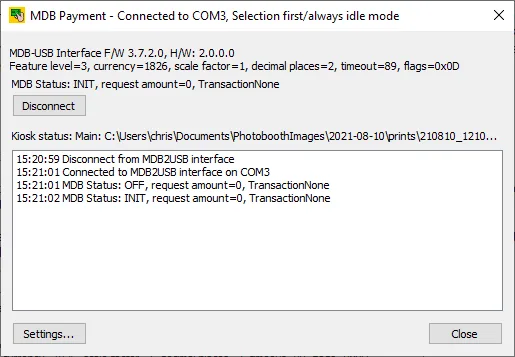
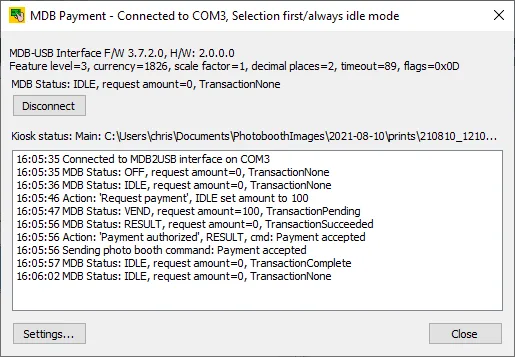
The MDB Utility should look something like this:
To skip the manual setup, click Load... in the MDB Utility settings and load MDB_kiosk_selection_first_ex1.xml. The steps below explain what each action does.
Step 1: Enable the Reader#
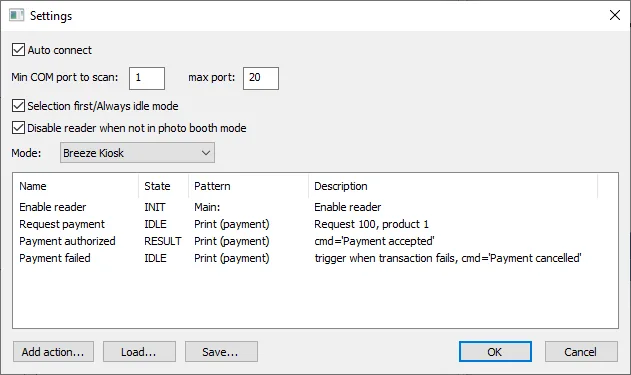
Click Settings.... Make sure Selection first/Always idle mode is ticked, and Mode is set to Breeze Kiosk.
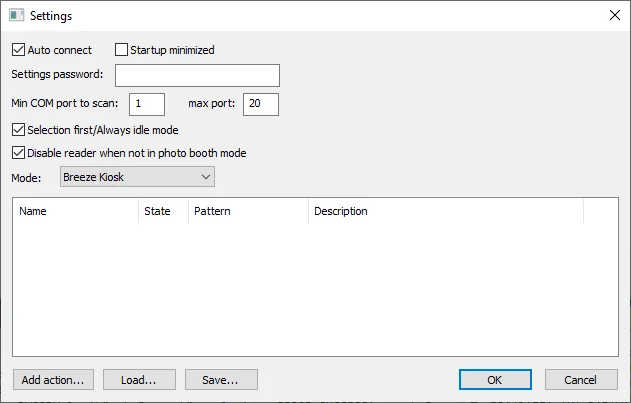
Click Add action...:
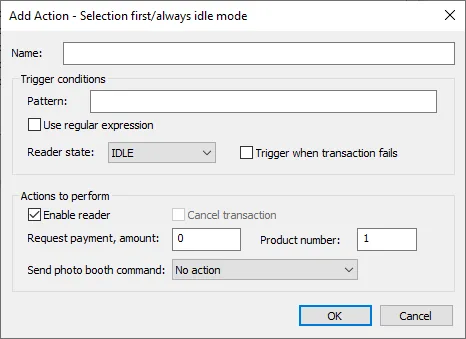
This action turns the card reader on when Breeze Kiosk shows the main screen and the reader is off.
| Field | Value |
|---|---|
| Name | Enable reader |
| Pattern | Main: |
| Reader state | INIT |
| Action | Enable reader |
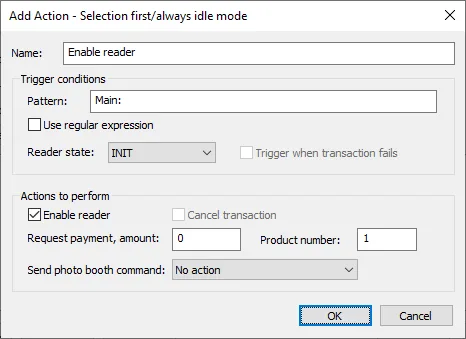
The pattern matches any part of the Breeze Kiosk status, such as Main: or Print (payment), unless Use regular expression is ticked. INIT means the reader is off.
Step 2: Request Payment#
When the guest taps Print, Breeze Kiosk switches to the print payment screen. This action asks the reader for the amount.
| Field | Value |
|---|---|
| Name | Request payment |
| Pattern | Print (payment) |
| Reader state | IDLE |
| Request payment, amount | The price in cents, e.g. 100 for $1.00 |
| Product number | Any number. It shows in your Nayax dashboard, which helps when you sell options at different prices. |
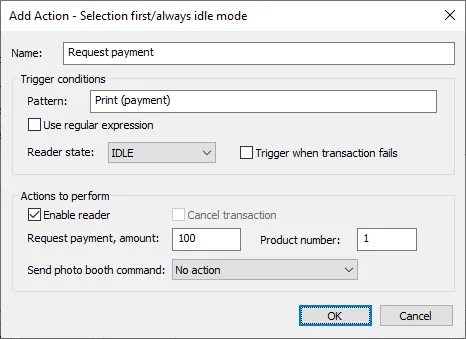
Amounts are in the smallest unit of your currency: cents for USD or EUR, pence for GBP.
The state then changes to VEND. If the payment is approved it changes to RESULT. If it fails, it returns to IDLE with the status TransactionFailed.
Step 3: Payment Authorised#
| Field | Value |
|---|---|
| Name | Payment authorised |
| Pattern | Print (payment) |
| Reader state | RESULT |
| Photo booth command | Payment accepted |
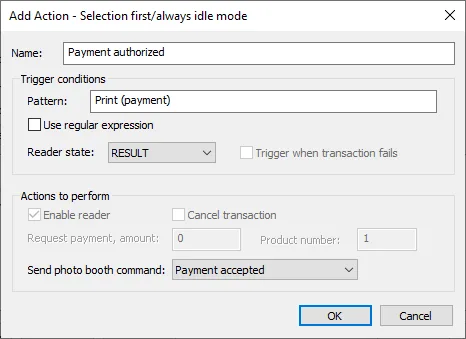
An action triggered by RESULT automatically confirms the sale with the reader, which shows a "Thank you" screen and returns to IDLE.
Step 4: Payment Failed#
If the payment isn't approved, times out or is cancelled on the reader, the state returns to IDLE with the status TransactionFailed. This action closes the print payment screen without printing.
| Field | Value |
|---|---|
| Name | Payment failed |
| Pattern | Print (payment) |
| Reader state | IDLE, transaction failed |
| Photo booth command | Payment cancelled |
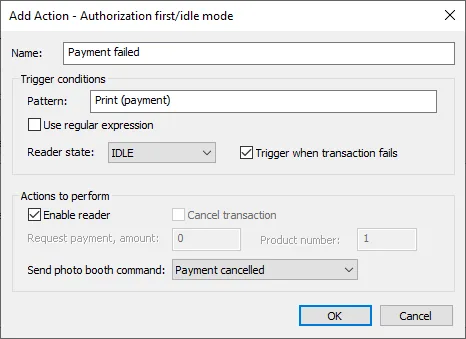
The settings should now list all four actions:
Test It#
- Click OK to return to the main screen of the MDB Utility.
- In Breeze Kiosk, tap Print. The reader shows the amount.
- Tap a card (or the Nayax technician card).
- Breeze Kiosk waits for the payment, prints the photos and returns to the main screen.
Optional: Cancel on the Reader When the Guest Cancels#
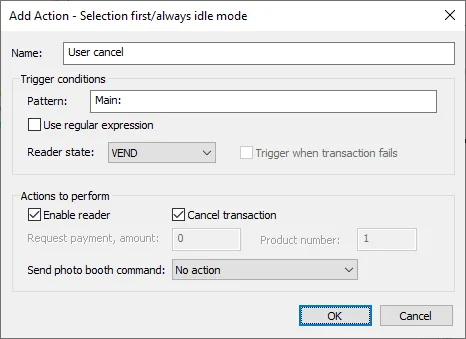
If the guest taps Cancel on the print payment screen, Breeze Kiosk returns to the main screen, but the reader still shows the payment request. To clear it, add an action that sends a cancel command to the reader when Breeze Kiosk shows the main screen (Main:) and the reader state is VEND.
Was this page helpful?
Thanks, that helps us improve the guides.