

Print layout templates (6 x 8)
52 free print layouts for 6 x 8 inch prints at 300 DPI, designed by SMOVE for Remote Pro and Webcam Photobooth.
About these templates
These templates are free, kindly provided by SMOVE. They work with the current releases of Remote Pro (DSLR Remote Pro) and Webcam Photobooth. With Webcam Photobooth, select the "DSLR template compatibility" option.
Every layout on this page is for 300 DPI printers set up for 6 x 8 inch prints. They suit any 300 DPI dye-sub photo booth printer, for example the DNP DS620/DS620A, DNP DS-RX1, Mitsubishi CP-D90DW, Mitsubishi CP-D70DW, HiTi P510 series, or any other printer that prints 6 x 8 at 300 DPI.
Some templates use extra fonts: download the fonts (2018-01-01_fonts.zip).
Copyright#
SMOVE sp. z o.o. keep the copyright of the templates and the images and photos in them. SMOVE give permission for them to be used with software from Breeze Systems Limited, and you are free to edit them to suit your event. They may not be used, copied, distributed or modified for use with software that is not from Breeze Systems Limited.
How to load a template
First load your printer with 6 x 8 inch media and set it to 300 DPI: run the photo booth software and click Printer Setup. Then download the template you want and open the ZIP file in Windows File Explorer. Load it in one of these ways:
- Copy the template file to your templates folder in File Explorer. Run the photo booth software, open the print layout editor and click Import layout.... The new template shows as a thumbnail: double-click it to load it.
- Open the print layout editor and drag the template file from File Explorer onto the print layout window. This loads the print layout, background.jpg and overlay.png into the editor, but doesn't copy the template file itself. Click Export layout... and enter a filename if you want to save it as a template.
- Open the print layout editor, click Import layout..., then drag the template file from File Explorer onto the print template window. This copies the template to your templates folder and highlights its thumbnail. Double-click the thumbnail to load it.
Birthday (13)
 Birthday 1+3 v1
[20x15] birthday 1+3 v1 Download template
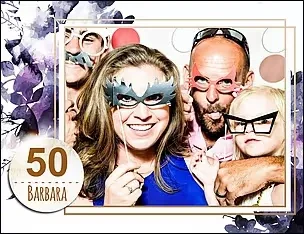 Birthday 1x1 v1
[20x15] birthday 1x1 v1 Download template
 Birthday 1x1 v2
[20x15] birthday 1x1 v2 Download template
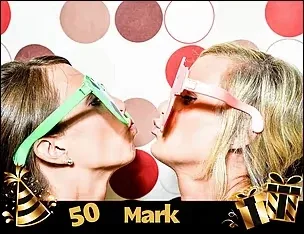 Birthday 1x1 v3
[20x15] birthday 1x1 v3 Download template
 Birthday 1x1 v4
[20x15] birthday 1x1 v4 Download template
 Birthday 1x1 v5
[20x15] birthday 1x1 v5 Download template
 Birthday 1x1 v6
[20x15] birthday 1x1 v6 Download template
 Birthday 1x1 v7
[20x15] birthday 1x1 v7 Download template
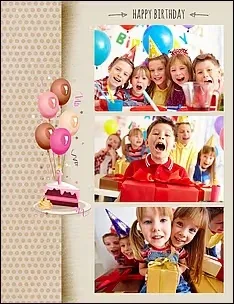 Birthday 3x1 v1
[20x15] birthday 3x1 v1 Download template
 Birthday 3x1 v2
[20x15] birthday 3x1 v2 Download template
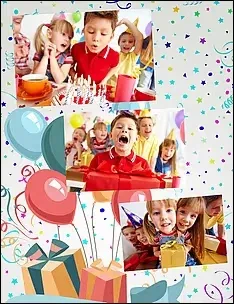 Birthday 3x1 v3
[20x15] birthday 3x1 v3 Download template
 Birthday 3x1 v4
[20x15] birthday 3x1 v4 Download template
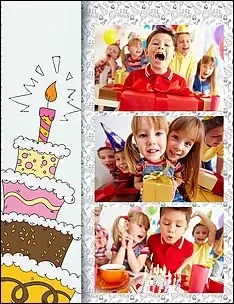 Birthday 3x1 v5
[20x15] birthday 3x1 v5 Download template
Christmas (6)
 Christmas 1x1 v3
[20x15] christmas 1x1 v3 Download template
 Christmas 1x1 v4
[20x15] christmas 1x1 v4 Download template
 Christmas 1x1 v5
[20x15] christmas 1x1 v5 Download template
 Christmas 3x1 v5
[20x15] christmas 3x1 v5 Download template
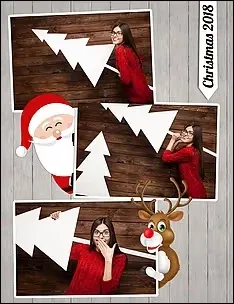 Christmas 3x1 v6
[20x15] christmas 3x1 v6 Download template
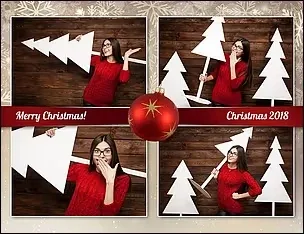 Christmas 4x1 v1
[20x15] christmas 4x1 v1 Download template
Event (16)
 Event 1+3 v1
[20x15] event 1+3 v1 Download template
 Event 1+3 v2
[20x15] event 1+3 v2 Download template
 Event 1+3 v3
[20x15] event 1+3 v3 Download template
 Event 1+3 v4
[20x15] event 1+3 v4 Download template
 Event 1+3 v5
[20x15] event 1+3 v5 Download template
 Event 1x1 v1
[20x15] event 1x1 v1 Download template
 Event 1x1 v2
[20x15] event 1x1 v2 Download template
 Event 1x1 v3
[20x15] event 1x1 v3 Download template
 Event 1x1 v4
[20x15] event 1x1 v4 Download template
 Event 1x1 v5
[20x15] event 1x1 v5 Download template
 Event 1x1 v6
[20x15] event 1x1 v6 Download template
 Event 1x1 v7
[20x15] event 1x1 v7 Download template
 Event 3x1 v1
[20x15] event 3x1 v1 Download template
 Event 3x1 v2
[20x15] event 3x1 v2 Download template
 Event 3x1 v3
[20x15] event 3x1 v3 Download template
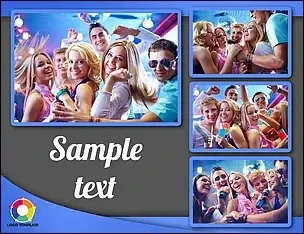
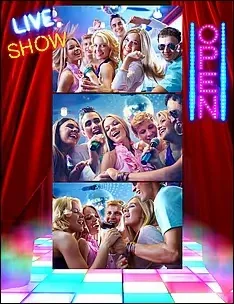 Event 3x1 v4
[20x15] event 3x1 v4 Download template
Wedding (12)
 Wedding 1+3 v1
[20x15] wedding 1+3 v1 Download template
 Wedding 1x1 v1
[20x15] wedding 1x1 v1 Download template
 Wedding 1x1 v2
[20x15] wedding 1x1 v2 Download template
 Wedding 1x1 v3
[20x15] wedding 1x1 v3 Download template
 Wedding 1x1 v4
[20x15] wedding 1x1 v4 Download template
 Wedding 1x1 v5
[20x15] wedding 1x1 v5 Download template
 Wedding 1x1 v6
[20x15] wedding 1x1 v6 Download template
 Wedding 1x1 v7
[20x15] wedding 1x1 v7 Download template
 Wedding 3x1 v1
[20x15] wedding 3x1 v1 Download template
 Wedding 3x1 v2
[20x15] wedding 3x1 v2 Download template
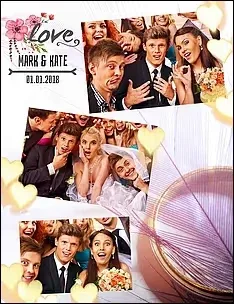 Wedding 3x1 v3
[20x15] wedding 3x1 v3 Download template
 Wedding 3x1 v4
[20x15] wedding 3x1 v4 Download template