Breeze Kiosk 2.0: contactless sharing and a clipboard
Kiosk 2.0 lets guests collect several photos in one email, share by scanning a QR code and see only their own photos.
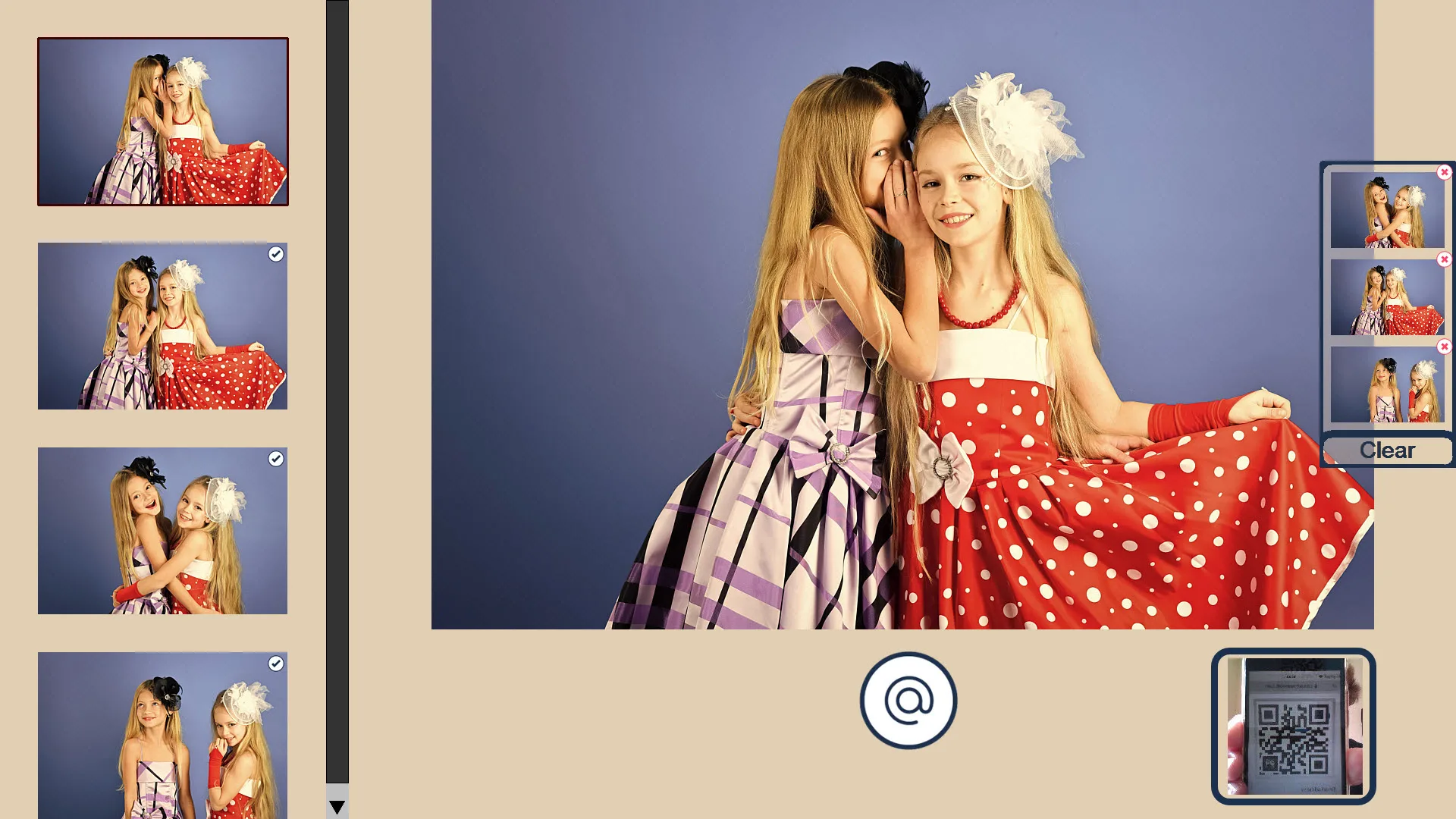
Breeze Kiosk 2.0 adds contactless sharing and a clipboard.
Clipboard#
Guests pick several photos, GIFs or videos and send them in one email. You choose the clipboard's look and position, and how many images guests can share.
Scan to share#
With DSLR Remote Pro or Breeze Booth for iPad running a contactless booth, guests scan the booth's QR code to share through Kiosk, or scan to send everything on their clipboard in one email.
See only your own photos#
Guests scan their unique QR code to see just their images, which suits big events and privacy rules such as GDPR. The email address or another unique ID needs to be in both the QR code and the image file names. Some characters in email addresses, such as / \ : * ? " < and >, can stop this working.
Also new#
- A startup.jpg screen while images load, which you can replace with your own
- Better thumbnail caching
- Support for Google's new Gmail sign-in: enter gmail in the Host field of the email server settings
- Bug fixes
2.0 was free for registered users who bought Kiosk after 5 June 2019.